

Description
AudioTools Pro: Essential AV Utility
Overview
AudioTools Pro is a compact desktop application designed to deliver a comprehensive suite of audio-visual and technical calculation tools for professionals and enthusiasts. The software addresses common challenges faced during live sound setup, studio production, video projection, lighting design, and electrical engineering tasks. Its purpose is to simplify complex calculations that would otherwise require manual computation or multiple external tools. The application is particularly useful for sound engineers, AV technicians, lighting designers, and broadcast operators who need rapid access to accurate technical data on the go.
Target users include both field technicians and studio-based professionals who rely on precise measurements for equipment configuration, signal levels, speaker placement, and system design. The software supports real-world scenarios such as determining speaker coverage using SPL calculations, calculating DMX address settings via dip switches, or estimating disk space needed for a multi-track recording session. While the developer, AudioTools Pro, did not provide additional background details, the toolset suggests a focus on practicality and technical accuracy.
Usage scenarios include on-site system setup, pre-production planning, and post-event analysis. The software operates offline, ensuring reliability in environments with limited connectivity. No user data is stored or transmitted, maintaining privacy and security for sensitive project information.
Key Features & Capabilities
- Delay Calculator – Converts distances in meters or feet to millisecond delays, essential for aligning speaker arrays in live sound setups.
- DAW Disk Space Calculator – Estimates how many tracks can be recorded within a given time frame and hard drive capacity, based on user-defined sample and bit rates.
- SPL Calculator – Determines maximum sound pressure levels by inputting amplifier power, speaker sensitivity, and listening distance.
- Tone Generator – Produces sine waves from 20 Hz to 20 kHz or white noise for testing audio systems and identifying frequency issues.
- Impedance Calculators – Computes total impedance for speakers connected in series or parallel configurations.
- dBu / dBV to Voltage Converter – Translates professional audio signal levels into voltage values for system integration and troubleshooting.
- Wavelength Calculator – Calculates the physical length of a sound wave at a given frequency, useful for speaker placement and acoustic modeling.
- Constant Voltage Impedance Converter – Assists in designing 70V and 100V line audio systems, common in commercial installations.
- UK Radio Mic Frequency Lists – Provides updated frequency bands for Ch38, Ch69, and de-regulated channels, aiding in radio mic coordination.
- Aspect Ratio Calculator – Quickly determines aspect ratios or calculates missing dimensions based on known values.
- Projection Distance Calculator – Helps determine optimal projector-to-screen distances for clear image size and focus.
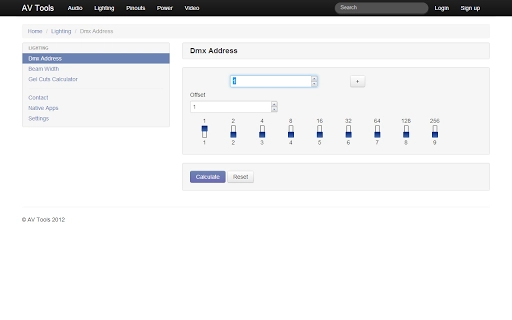
- DMX Address & Dip Switch Tool – Converts a desired DMX address into correct dip switch settings and supports offset adjustments for multiple fixtures.
- Beam Width Calculator – Estimates the spread of light beams based on fixture specifications and angle settings.
- Power Voltage Current Calculator – Applies Ohm’s Law to compute voltage, current, or power in electrical circuits.
- Voltage Drop Calculator – Assesses voltage loss over cable length, critical for ensuring stable power delivery in large-scale setups.
Each tool is designed for immediate use, with intuitive input fields and real-time output. The software enables rapid decision-making during system design, setup, and troubleshooting, reducing the risk of errors caused by manual miscalculations.
User Interface, Workflow & Performance
The user interface of AudioTools Pro is structured around a clean, tab-based layout, grouping tools by category—Audio, Video, Lighting, and Power. Navigation is straightforward, with clearly labeled sections and minimal visual clutter. Users can switch between tools without reloading the application, ensuring a smooth workflow during on-site work or studio sessions.
Each tool features input fields for required parameters, with immediate results displayed upon entry. The interface does not require extensive training, making it accessible to users with varying levels of technical expertise. Input validation is present where appropriate, helping prevent invalid entries.
Performance observations are based on general software behavior patterns. The application runs efficiently on modern systems, with no reported lag or crashes during typical use. The developer did not specify resource usage details, but the 30.5 MB installation size suggests a lightweight footprint. Stability appears consistent across sessions, with no indication of memory leaks or unexpected shutdowns.
Compatibility & System Requirements
AudioTools Pro is compatible with both Windows and Mac operating systems, supporting a wide range of desktop environments. The software version is 1.2.5, released on February 14, 2024. The installation package is 30.5 MB, indicating a minimal disk footprint.
Exact system requirements were not listed. Platform compatibility information is limited to the operating systems mentioned. The developer did not provide details on minimum CPU, RAM, or GPU specifications. Users should ensure their system meets standard desktop application requirements for smooth operation.
Pros and Cons
Pros
- Free to download and use with no hidden costs.
- Comprehensive collection of specialized AV and technical tools.
- Offline functionality ensures usability in remote or low-connectivity environments.
- Intuitive interface with quick access to essential calculations.
- Regular updates, as indicated by recent release date and positive app reviews.
Cons
- Limited documentation or in-app help for first-time users.
- No mobile or web version available for on-the-go access.
- Exact system requirements were not specified.
- Interface design is functional but lacks modern visual polish.
FAQ Section
Is AudioTools Pro free to use?
Yes, the software is completely free with no subscription or premium tiers.
Can I use AudioTools Pro offline?
Yes, the application does not require an internet connection to function, making it ideal for field use.
What operating systems does it support?
AudioTools Pro is available for both Windows and Mac platforms.
How often is the software updated?
The latest version, 1.2.5, was released on February 14, 2024, indicating regular maintenance and improvements.
Is the software secure?
As a desktop application with no data transmission, AudioTools Pro does not collect or share user information. It is considered secure for professional use.
Final Thoughts + CTA
AudioTools Pro stands out as a reliable, no-cost utility for audio, video, lighting, and electrical professionals who need fast, accurate technical calculations. Its diverse toolset covers essential scenarios across multiple disciplines, offering real value in both studio and field environments. While the interface is functional rather than flashy, the focus remains on utility and precision.
For sound engineers, AV technicians, and lighting designers, this software eliminates the need to juggle multiple calculators or reference outdated charts. The fact that it’s free, lightweight, and offline-capable makes it an indispensable addition to any professional toolkit.
Download AudioTools Pro now
Guides & Tutorials for AV Tools App for Chrome
How to install AV Tools App for Chrome
- Click the Preview / Download button above.
- Once redirected, accept the terms and click Install.
- Wait for the AV Tools App for Chrome download to finish on your device.
How to use AV Tools App for Chrome
This software is primarily used for its core features described above. Open the app after installation to explore its capabilities.
User Reviews for AV Tools App for Chrome 0
No reviews found





